Recent entries
Weeknotes: Llama 3, AI for Data Journalism, llm-evals and datasette-secrets three days ago
Llama 3 landed on Thursday. I ended up updating a whole bunch of different plugins to work with it, described in Options for accessing Llama 3 from the terminal using LLM.
I also wrote up the talk I gave at Stanford a few weeks ago: AI for Data Journalism: demonstrating what we can do with this stuff right now.
That talk had 12 different live demos in it, and a bunch of those were software that I hadn’t released yet when I gave the talk—so I spent quite a bit of time cleaning those up for release. The most notable of those is datasette-query-assistant, a plugin built on top of Claude 3 that takes a question in English and converts that into a SQL query. Here’s the section of that video with the demo.
I’ve also spun up two new projects which are still very much in the draft stage.
llm-evals
Ony of my biggest frustrations in working with LLMs is that I still don’t have a great way to evaluate improvements to my prompts. Did capitalizing OUTPUT IN JSON really make a difference? I don’t have a great mechanism for figuring that out.
datasette-query-assistant really needs this: Which models are best at generating SQLite SQL? What prompts make it most likely I’ll get a SQL query that executes successfully against the schema?
llm-evals-plugin (llmevals was taken on PyPI already) is a very early prototype of an LLM plugin that I hope to use to address this problem.
The idea is to define “evals” as YAML files, which might look something like this (format still very much in flux):
name: Simple translate
system: |
  Return just a single word in the specified language
prompt: |
  Apple in Spanish
checks:
- iexact: manzana
- notcontains: apple
Then, to run the eval against multiple models:
llm install llm-evals-plugin
llm evals simple-translate.yml -m gpt-4-turbo -m gpt-3.5-turbo
Which currently outputs this:
('gpt-4-turbo-preview', [True, True])
('gpt-3.5-turbo', [True, True])
Those checks: are provided by a plugin hook, with the aim of having plugins that add new checks like sqlite_execute: [["1", "Apple"]] that run SQL queries returned by the model and assert against the results—or even checks like js: response_text == 'manzana' that evaluate using a programming language (in that case using quickjs to run code in a sandbox).
This is still a rough sketch of how the tool will work. The big missing feature at the moment is parameterization: I want to be able to try out different prompt/system prompt combinations and run a whole bunch of additional examples that are defined in a CSV or JSON or YAML file.
I also want to record the results of those runs to a SQLite database, and also make it easy to dump those results out in a format that’s suitable for storing in a GitHub repository in order to track differences to the results over time.
This is a very early idea. I may find a good existing solution and use that instead, but for the moment I’m enjoying using running code as a way to explore a new problem space.
datasette-secrets
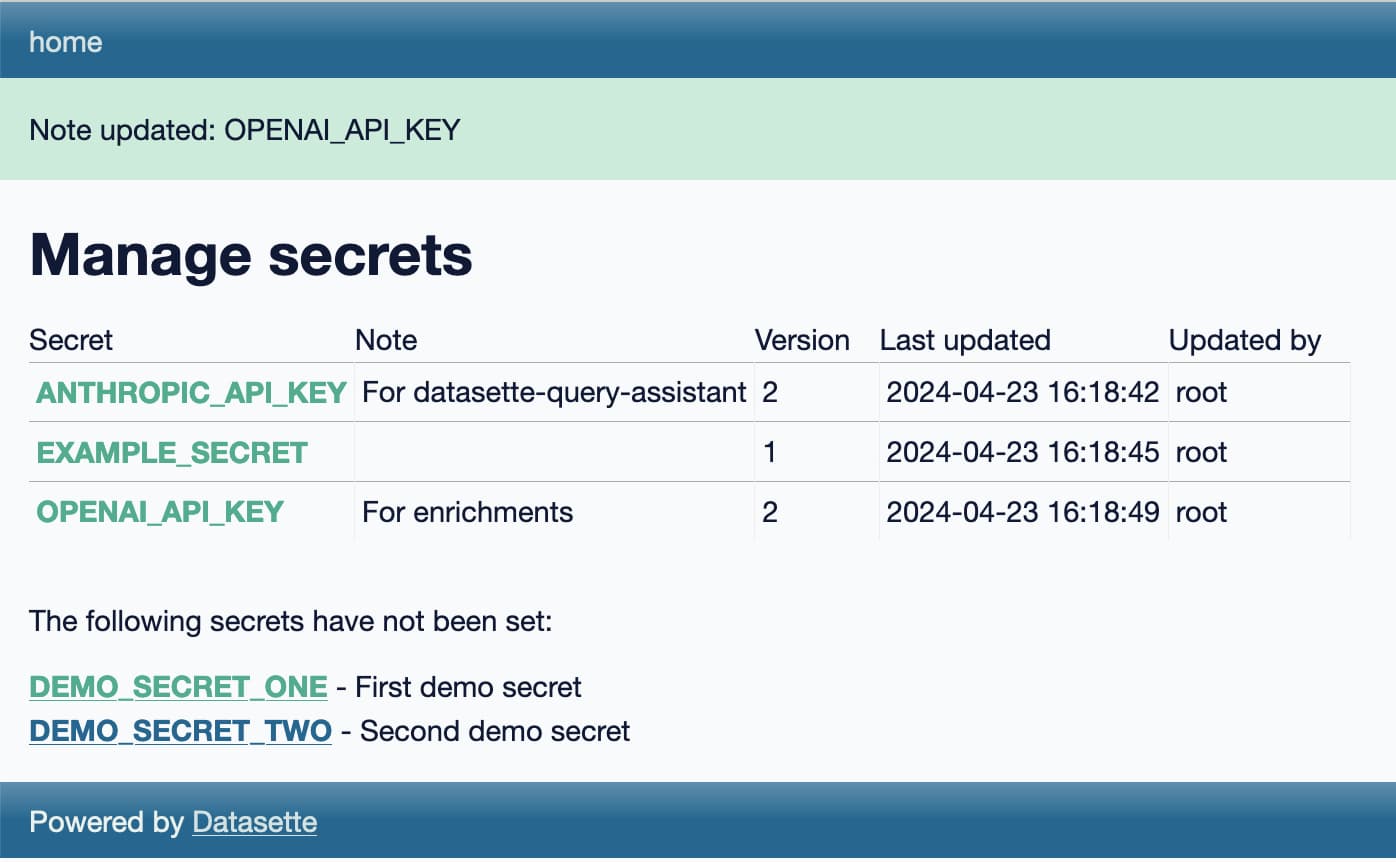
datasette-secrets is another draft project, this time a Datasette plugin.
I’m increasingly finding a need for Datasette plugins to access secrets—things like API keys. datasette-extract and datasette-enrichments-gpt both need an OpenAI API key, datasette-enrichments-opencage needs OpenCage Geocoder and datasette-query-assistant needs a key for Anthropic’s Claude.
Currently those keys are set using environment variables, but for both Datasette Cloud and Datasette Desktop I’d like users to be able to bring their own keys, without messing around with their environment.
datasette-secrets adds a UI for entering registered secrets, available to administrator level users with the manage-secrets permission. Those secrets are stored encrypted in the SQLite database, using symmetric encryption powered by the Python cryptography library.
The goal of the encryption is to ensure that if someone somehow obtains the SQLite database itself they won’t be able to access the secrets contained within, unless they also have access to the encryption key which is stored separately.
The next step with datasette-secrets is to ship some other plugins that use it. Once it’s proved itself there (and in an alpha release to Datasette Cloud) I’ll remove the alpha designation and start recommending it for use in other plugins.
Releases
-
datasette-secrets 0.1a1—2024-04-23
Manage secrets such as API keys for use with other Datasette plugins -
llm-llamafile 0.1—2024-04-22
Access llamafile localhost models via LLM -
llm-anyscale-endpoints 0.6—2024-04-21
LLM plugin for models hosted by Anyscale Endpoints -
llm-evals-plugin 0.1a0—2024-04-21
Run evals using LLM -
llm-gpt4all 0.4—2024-04-20
Plugin for LLM adding support for the GPT4All collection of models -
llm-fireworks 0.1a0—2024-04-18
Access fireworks.ai models via API -
llm-replicate 0.3.1—2024-04-18
LLM plugin for models hosted on Replicate -
llm-mistral 0.3.1—2024-04-18
LLM plugin providing access to Mistral models using the Mistral API -
llm-reka 0.1a0—2024-04-18
Access Reka models via the Reka API -
openai-to-sqlite 0.4.2—2024-04-17
Save OpenAI API results to a SQLite database -
datasette-query-assistant 0.1a2—2024-04-16
Query databases and tables with AI assistance -
datasette-cors 1.0.1—2024-04-12
Datasette plugin for configuring CORS headers -
asgi-cors 1.0.1—2024-04-12
ASGI middleware for applying CORS headers to an ASGI application -
llm-gemini 0.1a3—2024-04-10
LLM plugin to access Google’s Gemini family of models
TILs
Options for accessing Llama 3 from the terminal using LLM four days ago
Llama 3 was released on Thursday. Early indications are that it’s now the best available openly licensed model—Llama 3 70b Instruct has taken joint 5th place on the LMSYS arena leaderboard, behind only Claude 3 Opus and some GPT-4s and sharing 5th place with Gemini Pro and Claude 3 Sonnet. But unlike those other models Llama 3 70b is weights available and can even be run on a (high end) laptop!
My LLM command-line tool and Python library provides access to dozens of models via plugins. Here are several ways you can use it to access Llama 3, both hosted versions and running locally on your own hardware.
- Llama-3-8B-Instruct locally with llm-gpt4all
- Fast API access via Groq
- Local Llama 3 70b Instruct with llamafile
- Paid access via other API providers
Llama-3-8B-Instruct locally with llm-gpt4all
If you want to run Llama 3 locally, the easiest way to do that with LLM is using the llm-gpt4all plugin. This plugin builds on the excellent gpt4all project by Nomic AI, providing a quantized (q4) Llama 3 8B instruct model that needs 8GB of RAM and requires a 4.34GB download.
If you don’t have LLM installed yet, install it like this:
brew install llmOr like this:
pipx install llmInstall the plugin:
llm install llm-gpt4allThe first time you run a prompt it will download the model:
llm -m Meta-Llama-3-8B-Instruct "Three great names for a pet emu"What an interesting question! Here are three name suggestions for your pet emu:
- Emmet: A playful take on the word “emu” that suits a friendly and curious bird.
- Gizmo: Emus are known for their quirky behavior, so Gizmo is a fitting name to capture their unique personality.
- Aussie: As an Australian native species, naming your emu Aussie would be a nod to its heritage.
Remember to choose a name that suits your pet’s temperament and characteristics!
Each time you run a command like this the model will be loaded into memory from scratch. To keep it resident in memory, use the llm chat command:
llm chat -m Meta-Llama-3-8B-InstructHere’s an example session:
Chatting with Meta-Llama-3-8B-Instruct
Type 'exit' or 'quit' to exit
Type '!multi' to enter multiple lines, then '!end' to finish
> javascript function to reverse a string
%
Here is the JavaScript code that reverses a given string:
```
function reverseString(str) {
  return str.split("").reverse().join("");
}
```

You can use this function by passing your desired input string as an argument, like so:

```javascript
let reversedStr = reverseString("Hello World");
console.log(reversedStr); // Output: "dlroW olleH"
```
In the code above:
- `str.split("")` splits the original string into individual characters.
- `.reverse()` reverses the order of those characters.
- `.join("")` combines them back together as a single string.

This function works for any input string, not just "Hello World". Try it out with different strings to see how it handles punctuation and spaces!
> capitalize it too
%
Here's an updated JavaScript function that not only reverses the input string but also capitalizes each character:
```javascript
function reverseAndCapitalize(str) {
  return str.split("").reverse().map(function(char) {
    if (char.match(/[a-z]/i)) {
      return char.toUpperCase();
    } else {
      return char;
    }
  }).join("");
}
```
(I’m not sure I’d write reverseAndCapitalize() quite like that, but still a fun example!)
Consult the LLM documentation for more details on how to use the command-line tool.
Fast API access via Groq
Groq serve openly licensed LLMs at ludicrous speeds using their own custom LPU (Language Processing Unit) Inference Engine. They currently offer a free preview of their API: you can sign up and obtain an API key to start using it.
You can run prompts against Groq using their OpenAI compatible API endpoint.
Edit the file ~/Library/Application Support/io.datasette.llm/extra-openai-models.yaml—creating it if it doesn’t exist—and add the following lines to it:
- model_id: groq-openai-llama3
  model_name: llama3-70b-8192
  api_base: https://api.groq.com/openai/v1
  api_key_name: groq
- model_id: groq-openai-llama3-8b
  model_name: llama3-8b-8192
  api_base: https://api.groq.com/openai/v1
  api_key_name: groq
This tells LLM about those models, and makes them accessible via those configured model_id values.
Run this command to confirm that the models were registered correctly:
llm models | grep groqYou should see this:
OpenAI Chat: groq-openai-llama3
OpenAI Chat: groq-openai-llama3-8b
Set your Groq API key like this:
llm keys set groq
# <Paste your API key here>
Now you should be able to run prompts through the models like this:
llm -m groq-openai-llama3 "A righteous sonnet about a brave owl"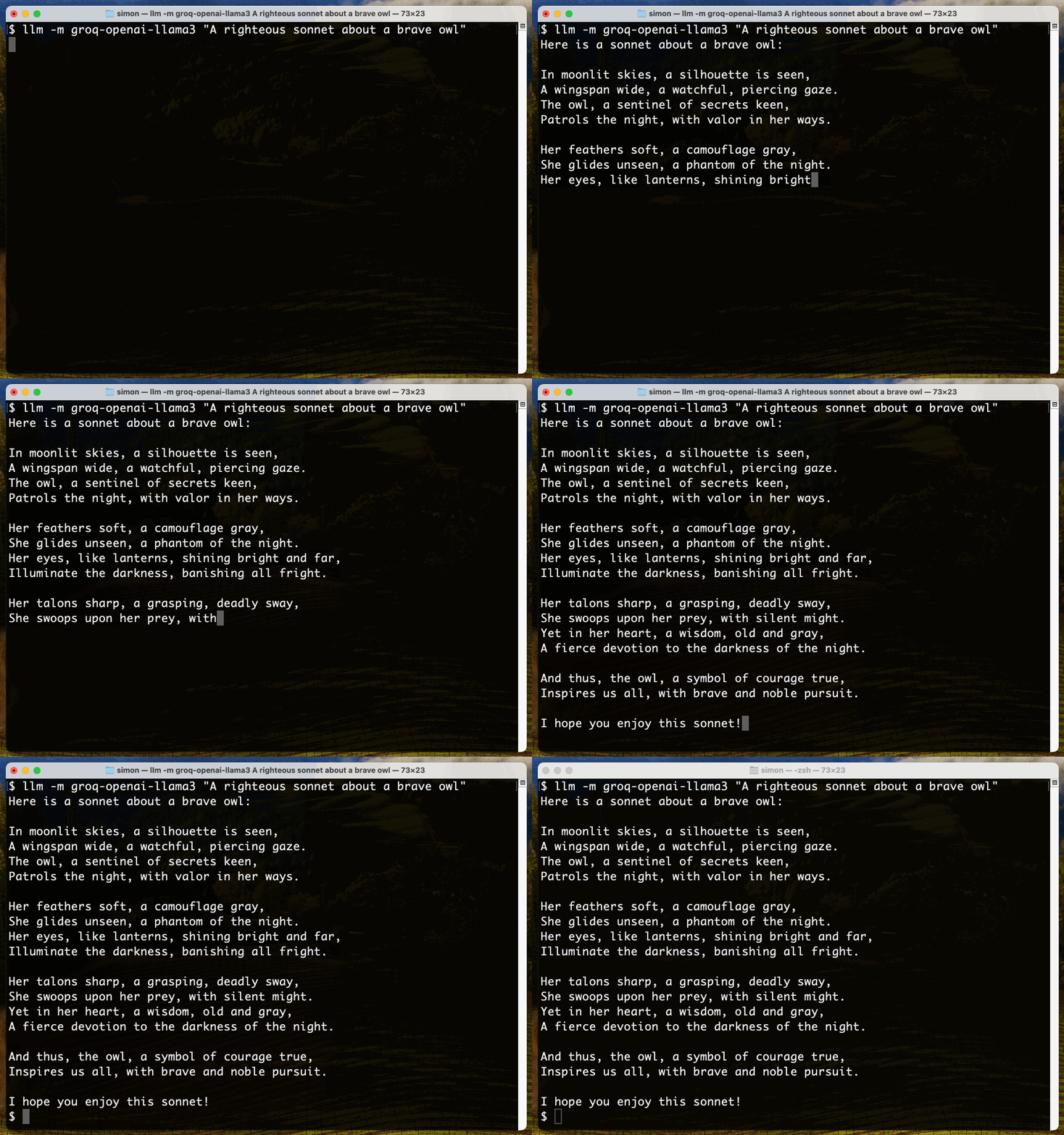
Groq is fast.
There’s also a llm-groq plugin but it hasn’t shipped support for the new models just yet—though there’s a PR for that by Lex Herbert here and you can install the plugin directly from that PR like this:
llm install https://github.com/lexh/llm-groq/archive/ba9d7de74b3057b074a85fe99fe873b75519bd78.zip
llm keys set groq
# paste API key here
llm -m groq-llama3-70b 'say hi in spanish five ways'
Local Llama 3 70b Instruct with llamafile
The Llama 3 8b model is easy to run on a laptop, but it’s pretty limited in capability. The 70b model is the one that’s starting to get competitive with GPT-4. Can we run that on a laptop?
I managed to run the 70b model on my 64GB MacBook Pro M2 using llamafile (previously on this blog)—after quitting most other applications to make sure the 37GB of RAM it needed was available.
I used the Meta-Llama-3-70B-Instruct.Q4_0.llamafile Q4 version from jartine/Meta-Llama-3-70B-Instruct-llamafile—a 37GB download. I have a dedicated external hard disk (a Samsung T7 Shield) for this kind of thing.
Here’s how I got it working:
curl -L -o Meta-Llama-3-70B-Instruct.Q4_0.llamafile 'https://huggingface.co/jartine/Meta-Llama-3-70B-Instruct-llamafile/resolve/main/Meta-Llama-3-70B-Instruct.Q4_0.llamafile?download=true'
# That downloads 37GB - now make it executable
chmod 755 Meta-Llama-3-70B-Instruct.Q4_0.llamafile
# And start it running:
./Meta-Llama-3-70B-Instruct.Q4_0.llamafile
A llamafile is an executable that runs on virtually any platform—see my previous notes on Cosmopolitan and Actually Portable Executable for more on how that works.
This will take quite a while to start, because it needs to load that full 37GB of binary content into memory. Once it’s finished loading a local web server becomes available at http://127.0.0.1:8080/—this serves a web UI you can use to interact with the model, and also serves another OpenAI-compatible API endpoint.
The easiest way to access this from LLM is to install the llm-llamafile plugin:
llm install llm-llamafileAll this plugin does is configure a model called llamafile that attempts to access the model hosted on port 8080. You can run prompts like this:
llm -m llamafile "3 neat characteristics of a pelican"Here are three neat characteristics of a pelican:
Unique Beak: Pelicans have a distinctive beak that is shaped like a scoop or a basket. This beak is specially designed to catch fish, and it can hold up to 3 gallons of water! The beak is also very sensitive, which helps pelicans detect the presence of fish in the water.
Waterproof Feathers: Pelicans have a special coating on their feathers that makes them waterproof. This is essential for their fishing lifestyle, as they need to be able to dive into the water without getting weighed down by wet feathers. The coating is made up of a waxy substance that helps to repel water.
Pouch-Like Throat: Pelicans have a unique throat pouch that allows them to catch and store fish. When they dive into the water, they use their beak to scoop up fish, and then they store them in their throat pouch. The pouch can expand to hold multiple fish, and the pelican can then swallow the fish whole or regurgitate them to feed their young. This pouch is a key adaptation that helps pelicans thrive in their aquatic environment.
If you don’t want to install another plugin, you can instead configure the model by adding this to your openai-extra-models.yaml file:
- model_id: llamafile
  model_name: llamafile
  api_base: http://localhost:8080/v1
  api_key: x
One warning about this approach: if you use LLM like this then every prompt you run through llamafile will be stored under the same model name in your SQLite logs, even if you try out different llamafile models at different times. You could work around this by registering them with different model_id values in the YAML file.
Paid access via other API providers
A neat thing about open weight models is that multiple API providers can offer them, encouraging them to aggressively compete on price.
Groq is currently free, but that’s with a limited number of free requests.
A number of other providers are now hosting Llama 3, and many of them have plugins available for LLM. Here are a few examples:
-
Perplexity Labs are offering
llama-3-8b-instructandllama-3-70b-instruct. The llm-perplexity plugin provides access—llm install llm-perplexityto install,llm keys set perplexityto set an API key and then run prompts against those two model IDs. Current price for 8b is $0.20 per million tokens, for 80b is $1.00. -
Anyscale Endpoints have
meta-llama/Llama-3-8b-chat-hf($0.15/million tokens) andmeta-llama/Llama-3-70b-chat-hf($1.0/million tokens) (pricing).llm install anyscale-endpoints, thenllm keys set anyscale-endpointsto set the API key. -
Fireworks AI have
fireworks/models/llama-v3-8b-instructfor $0.20/million andfireworks/models/llama-v3-70b-instructfor $0.90/million (pricing).llm install fireworks, thenllm keys set fireworksto set the API key. - OpenRouter provide proxied accessed to Llama 3 from a number of different providers at different prices, documented on their meta-llama/llama-3-70b-instruct and meta-llama/llama-3-8b-instruct pages (and more). Use the llm-openrouter plugin for those.
-
Together AI has both models as well. The llm-together plugin provides access to
meta-llama/Llama-3-8b-chat-hfandmeta-llama/Llama-3-70b-chat-hf.
I’m sure there are more—these are just the ones I’ve tried out myself. Check the LLM plugin directory for other providers, or if a provider emulates the OpenAI API you can configure with the YAML file as shown above or described in the LLM documentation.
That’s a lot of options
One key idea behind LLM is to use plugins to provide access to as many different models as possible. Above I’ve listed two ways to run Llama 3 locally and six different API vendors that LLM can access as well.
If you’re inspired to write your own plugin it’s pretty simple: each of the above plugins is open source, and there’s a detailed tutorial on Writing a plugin to support a new model on the LLM website.
AI for Data Journalism: demonstrating what we can do with this stuff right now nine days ago
I gave a talk last month at the Story Discovery at Scale data journalism conference hosted at Stanford by Big Local News. My brief was to go deep into the things we can use Large Language Models for right now, illustrated by a flurry of demos to help provide starting points for further conversations at the conference.
I used the talk as an opportunity for some demo driven development—I pulled together a bunch of different project strands for the talk, then spent the following weeks turning them into releasable tools.
There are 12 live demos in this talk!
- Haikus from images with Claude 3 Haiku
- Pasting data from Google Sheets into Datasette Cloud
- AI-assisted SQL queries with datasette-query-assistant
- Scraping data with shot-scraper
- Enriching data in a table
- Command-line tools for working with LLMs
- Structured data extraction
- Code Interpreter and access to tools
- Running queries in Datasette from ChatGPT using a GPT
- Semantic search with embeddings
- Datasette Scribe: searchable Whisper transcripts
- Trying and failing to analyze hand-written campaign finance documents
The full 50 minute video of my talk is available on YouTube. Below I’ve turned that video into an annotated presentation, with screenshots, further information and links to related resources and demos that I showed during the talk.
Three major LLM releases in 24 hours (plus weeknotes) 17 days ago
I’m a bit behind on my weeknotes, so there’s a lot to cover here. But first... a review of the last 24 hours of Large Language Model news. All times are in US Pacific on April 9th 2024.
- 11:01am: Google Gemini Pro 1.5 hits general availability, here’s the blog post—their 1 million token context GPT-4 class model now has no waitlist, is available to anyone in 180 countries (not including Europe or the UK as far as I can tell) and most impressively all the API has a free tier that allows up to 50 requests a day, though rate limited to 2 per minute. Beyond that you can pay $7/million input tokens and $21/million output tokens, which is slightly less than GPT-4 Turbo and a little more than Claude 3 Sonnet. Gemini Pro also now support audio inputs and system prompts.
- 11:44am: OpenAI finally released the non-preview version of GPT-4 Turbo, integrating GPT-4 Vision directly into the model (previously it was separate). Vision mode now supports both functions and JSON output, previously unavailable for image inputs. OpenAI also claim that the new model is “Majorly improved” but no-one knows what they mean by that.
- 6:20pm (3:20am in their home country of France): Mistral tweet a link to a 281GB magnet BitTorrent of Mixtral 8x22B—their latest openly licensed model release, significantly larger than their previous best open model Mixtral 8x7B. I’ve not seen anyone get this running yet but it’s likely to perform extremely well, given how good the original Mixtral was.
And while it wasn’t released today (it came out last week), this morning Cohere’s Command R+ (an excellent openly licensed model) reached position 6 on the LMSYS Chatbot Arena Leaderboard—the highest ever ranking for an open weights model.
Since I have a lot of software that builds on these models, I spent a bunch of time today publishing new releases of things.
Datasette Extract with GPT-4 Turbo Vision
I’ve been working on Datasette Extract for a while now: it’s a plugin for Datasette that adds structured data extraction from unstructured text, powered by GPT-4 Turbo.
I updated it for the new model releases this morning, and decided to celebrate by making a video showing what it can do:
I want to start publishing videos like this more often, so this felt like a great opportunity to put that into practice.
The Datasette Cloud blog hasn’t had an entry in a while, so I published screenshots and notes there to accompany the video.
Gemini Pro 1.5 system prompts
I really like system prompts—extra prompts you can pass to an LLM that give it instructions about how to process the main input. They’re sadly not a guaranteed solution for prompt injection—even with instructions separated from data by a system prompt you can still over-ride them in the main prompt if you try hard enough—but they’re still useful for non-adversarial situations.
llm-gemini 0.1a2 adds support for them, so now you can do things like this:
llm -m p15 'say hi three times three different ways' \
  --system 'in spanish'
And get back output like this:
¡Hola! 👋 ¡Buenos días! ☀️ ¡Buenas tardes! 😊
Interestingly “in german” doesn’t include emoji, but “in spanish” does.
I had to reverse-engineer the REST format for sending a system prompt from the Python library as the REST documentation hasn’t been updated yet—notes on that in my issue.
datasette-enrichments-gpt using GPT-4 Turbo
Another small release: the datasette-enrichments-gpt plugin can enrich data in a table by running prompts through GPT-3.5, GPT-4 Turbo or GPT-4 Vision. I released version 0.4 switching to the new GPT-4 Turbo model.
Everything else
That covers today... but my last weeknotes were nearly four weeks ago! Here’s everything else, with a few extra annotations:
Blog entries
All five of my most recent posts are about ways that I use LLM tools in my own work—see also my How I use LLMs and ChatGPT series.
- Building files-to-prompt entirely using Claude 3 Opus
- Running OCR against PDFs and images directly in your browser
- llm cmd undo last git commit—a new plugin for LLM
- Building and testing C extensions for SQLite with ChatGPT Code Interpreter
- Claude and ChatGPT for ad-hoc sidequests
Releases
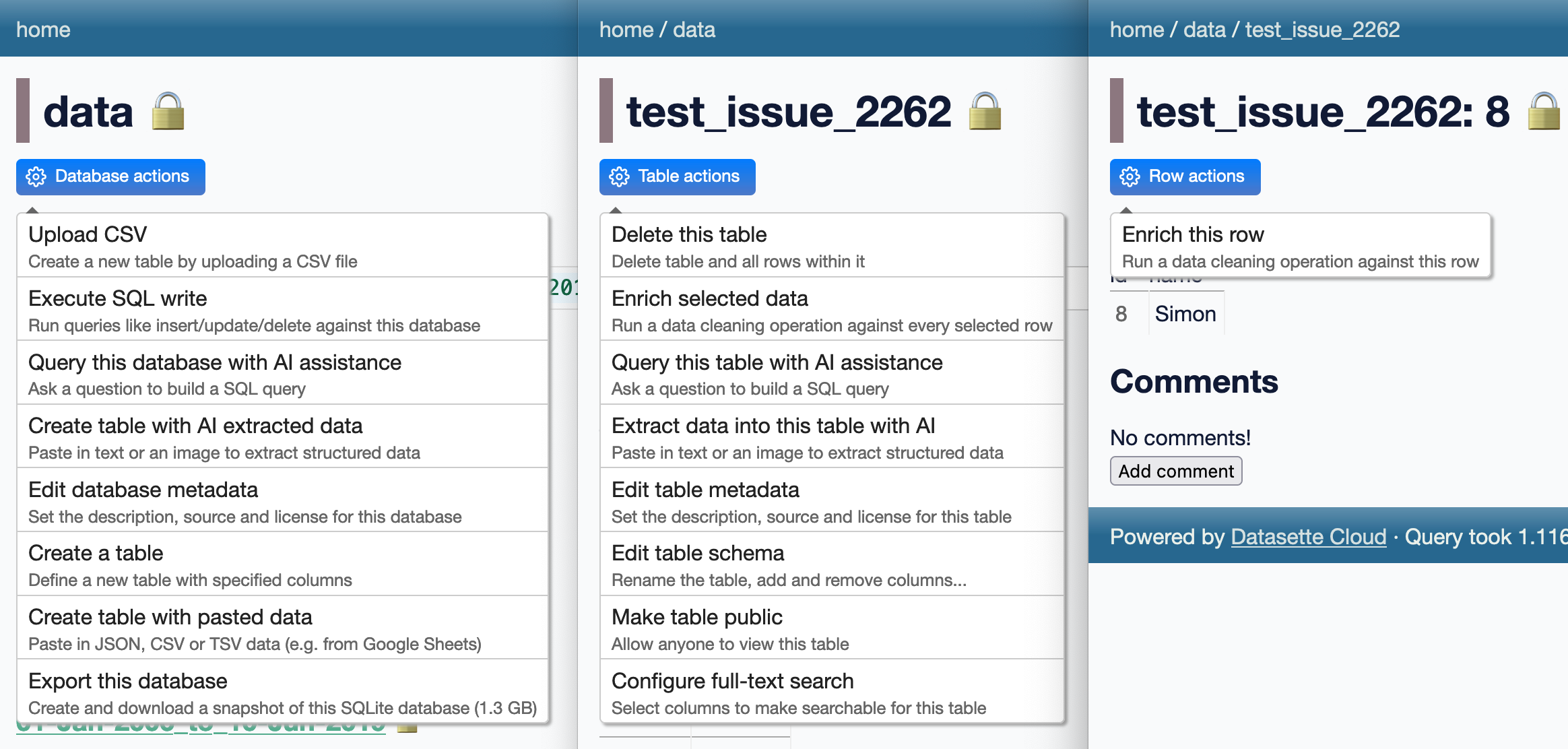
Many of these releases relate to ongoing work on Datasette Cloud. In particular there’s a flurry of minor releases to add descriptions to the action menu items added by various plugins, best illustrated by this screenshot:
-
datasette-enrichments-gpt 0.4—2024-04-10
Datasette enrichment for analyzing row data using OpenAI’s GPT models -
llm-gemini 0.1a2—2024-04-10
LLM plugin to access Google’s Gemini family of models -
datasette-public 0.2.3—2024-04-09
Make specific Datasette tables visible to the public -
datasette-enrichments 0.3.2—2024-04-09
Tools for running enrichments against data stored in Datasette -
datasette-extract 0.1a4—2024-04-09
Import unstructured data (text and images) into structured tables -
datasette-cors 1.0—2024-04-08
Datasette plugin for configuring CORS headers -
asgi-cors 1.0—2024-04-08
ASGI middleware for applying CORS headers to an ASGI application -
files-to-prompt 0.2.1—2024-04-08
Concatenate a directory full of files into a single prompt for use with LLMs -
datasette-embeddings 0.1a3—2024-04-08
Store and query embedding vectors in Datasette tables -
datasette-studio 0.1a3—2024-04-06
Datasette pre-configured with useful plugins. Experimental alpha. -
datasette-paste 0.1a5—2024-04-06
Paste data to create tables in Datasette -
datasette-import 0.1a4—2024-04-06
Tools for importing data into Datasette -
datasette-enrichments-quickjs 0.1a2—2024-04-05
Enrich data with a custom JavaScript function -
s3-credentials 0.16.1—2024-04-05
A tool for creating credentials for accessing S3 buckets -
llm-command-r 0.2—2024-04-04
Access the Cohere Command R family of models -
llm-nomic-api-embed 0.1—2024-03-30
Create embeddings for LLM using the Nomic API -
textract-cli 0.1—2024-03-29
CLI for running files through AWS Textract -
llm-cmd 0.1a0—2024-03-26
Use LLM to generate and execute commands in your shell -
datasette-write 0.3.2—2024-03-18
Datasette plugin providing a UI for executing SQL writes against the database
TILs
- impaste: pasting images to piped commands on macOS—2024-04-04
- Installing tools written in Go—2024-03-26
- Google Chrome --headless mode—2024-03-24
- Reviewing your history of public GitHub repositories using ClickHouse—2024-03-20
- Running self-hosted QuickJS in a browser—2024-03-20
- Programmatically comparing Python version strings—2024-03-17
Building files-to-prompt entirely using Claude 3 Opus 18 days ago
files-to-prompt is a new tool I built to help me pipe several files at once into prompts to LLMs such as Claude and GPT-4.
When combined with my LLM command-line tool it lets you do things like this:
files-to-prompt README.md files_to_prompt | llm -m opus \
  --system 'Update this README to reflect this functionality'
I wrote files-to-prompt almost entirely using Claude 3 Opus, llm-claude-3 and files-to-prompt itself, once it was functional enough to be useful.
Building the initial tool
I started with my click-app cookiecutter template. This can quickly spin up a skeleton of a new Python command-line tool using the Click library:
cookiecutter gh:simonw/click-app
  [1/6] app_name (): files-to-prompt
  [2/6] description (): Concatenate a directory full of files into a single prompt for use with LLMs
  [3/6] hyphenated (files-to-prompt):
  [4/6] underscored (files_to_prompt):
  [5/6] github_username (): simonw
  [6/6] author_name (): Simon Willison
I opened the files_to_prompt/cli.py file it created for me and used it to spec out how the initial version should work:
import click


@click.command()
@click.argument(
    "path",
    type=click.Path
)
@click.option(
    "--include-hidden",
    is_flag=True,
    help="Include files and folders starting with .",
)
@click.version_option()
def cli(path, include_hidden):
    """
    Takes a path to a folder and outputs every file in that folder,
    recursively, each one preceeded with its filename like this:

    path/to/file.py
    ----
    Contents of file.py goes here

    ---
    path/to/file2.py
    ---
    ...
    """
This code defines a tool that takes a positional path argument and an optional --include-hidden flag, along with a Python docstring describing what it should do which will be displayed as the --help output.
I’d originally intended to actually build the tool... but once I got to this point I realized that this might be enough information for Claude 3 Opus to do the rest of the work for me.
So I ran this command:
cat files_to_prompt/cli.py | llm -m opus \
  --system 'finish this code for me'
You can see the full transcript here, but from this single prompt Claude 3 Opus produced the exact implementation I needed:
    for root, dirs, files in os.walk(path):
        if not include_hidden:
            dirs[:] = [d for d in dirs if not d.startswith(".")]
            files = [f for f in files if not f.startswith(".")]

        for file in files:
            file_path = os.path.join(root, file)
            with open(file_path, "r") as f:
                file_contents = f.read()

            click.echo(file_path)
            click.echo("---")
            click.echo(file_contents)
            click.echo()
            click.echo("---")
I pasted that into by cli.py module and tried running it... and it worked first time.
I tried a more challenging prompt next:
cat files_to_prompt/cli.py | llm -m opus '
modify this code to add a --ignore-gitignore flag which defaults toFalse.
Without this flag the code should read any .gitignore files and filter
content based on the rules within them. With the flag it should not do
that.'
I forgot to use the --system option here, so the argument prompt I passed to llm was concatenated directly onto the end of the code rather than being treated as a system/instruction prompt. This turned out not to matter.
.gitignore is a tricky format to handle. Claude 3 Opus didn’t do a comprehensive implementation, but it did support the subset that I cared about for this step of the development process.
Here’s what it gave me (full transcript here):
import os
import click
from pathlib import Path
from fnmatch import fnmatch


def should_ignore(path, gitignore_rules):
    for rule in gitignore_rules:
        if fnmatch(path, rule):
            return True
    return False


def read_gitignore(path):
    gitignore_path = os.path.join(path, ".gitignore")
    if os.path.isfile(gitignore_path):
        with open(gitignore_path, "r") as f:
            return [line.strip() for line in f if line.strip() and not line.startswith("#")]
    return []


@click.command()
@click.argument(
    "path",
    type=click.Path(exists=True, file_okay=False, dir_okay=True, readable=True),
)
@click.option(
    "--include-hidden",
    is_flag=True,
    help="Include files and folders starting with .",
)
@click.option(
    "--ignore-gitignore",
    is_flag=True,
    help="Ignore .gitignore files and include all files",
)
@click.version_option()
def cli(path, include_hidden, ignore_gitignore):
    """
    Takes a path to a folder and outputs every file in that folder,
    recursively, each one preceded with its filename like this:

    path/to/file.py
    ----
    Contents of file.py goes here

    ---
    path/to/file2.py
    ---
    ...
    """
    gitignore_rules = [] if ignore_gitignore else read_gitignore(path)

    for root, dirs, files in os.walk(path):
        if not include_hidden:
            dirs[:] = [d for d in dirs if not d.startswith(".")]
            files = [f for f in files if not f.startswith(".")]

        if not ignore_gitignore:
            gitignore_rules.extend(read_gitignore(root))
            dirs[:] = [d for d in dirs if not should_ignore(os.path.join(root, d), gitignore_rules)]
            files = [f for f in files if not should_ignore(os.path.join(root, f), gitignore_rules)]

        for file in files:
            file_path = os.path.join(root, file)
            with open(file_path, "r") as f:
                file_contents = f.read()

            click.echo(file_path)
            click.echo("---")
            click.echo(file_contents)
            click.echo()
            click.echo("---")
From that point on I was hooked: could I use the new files-to-prompt tool to build the rest of itself?
Since I’d already bootstrapped it to a point where I could use it, I ran it for real for the first time:
files-to-prompt . | llm -m opus --system '
fill out the test_files_to_prompt.py with tests, use tmpdir fixture
to create example directories to run the command against - tests
should cover both of the optional flags'
Here I’m sending it quite a bit of code—the implementation, the README and the Apache 2 License are all included in that prompt.
It wrote me these tests:
import os
from click.testing import CliRunner
from files_to_prompt.cli import cli

def test_basic_functionality(tmpdir):
    runner = CliRunner()
    with tmpdir.as_cwd():
        os.makedirs("test_dir")
        with open("test_dir/file1.txt", "w") as f:
            f.write("Contents of file1")
        with open("test_dir/file2.txt", "w") as f:
            f.write("Contents of file2")

        result = runner.invoke(cli, ["test_dir"])
        assert result.exit_code == 0
        assert "test_dir/file1.txt" in result.output
        assert "Contents of file1" in result.output
        assert "test_dir/file2.txt" in result.output
        assert "Contents of file2" in result.output

def test_include_hidden(tmpdir):
    runner = CliRunner()
    with tmpdir.as_cwd():
        os.makedirs("test_dir")
        with open("test_dir/.hidden.txt", "w") as f:
            f.write("Contents of hidden file")

        result = runner.invoke(cli, ["test_dir"])
        assert result.exit_code == 0
        assert "test_dir/.hidden.txt" not in result.output

        result = runner.invoke(cli, ["test_dir", "--include-hidden"])
        assert result.exit_code == 0
        assert "test_dir/.hidden.txt" in result.output
        assert "Contents of hidden file" in result.output

def test_ignore_gitignore(tmpdir):
    runner = CliRunner()
    with tmpdir.as_cwd():
        os.makedirs("test_dir")
        with open("test_dir/.gitignore", "w") as f:
            f.write("ignored.txt")
        with open("test_dir/ignored.txt", "w") as f:
            f.write("This file should be ignored")
        with open("test_dir/included.txt", "w") as f:
            f.write("This file should be included")

        result = runner.invoke(cli, ["test_dir"])
        assert result.exit_code == 0
        assert "test_dir/ignored.txt" not in result.output
        assert "test_dir/included.txt" in result.output

        result = runner.invoke(cli, ["test_dir", "--ignore-gitignore"])
        assert result.exit_code == 0
        assert "test_dir/ignored.txt" in result.output
        assert "This file should be ignored" in result.output
        assert "test_dir/included.txt" in result.output
Then I ran them... and they failed. Here’s the error message:
    def test_ignore_gitignore(tmpdir):
        runner = CliRunner()
        with tmpdir.as_cwd():
            os.makedirs("test_dir")
            with open("test_dir/.gitignore", "w") as f:
                f.write("ignored.txt")
            with open("test_dir/ignored.txt", "w") as f:
                f.write("This file should be ignored")
            with open("test_dir/included.txt", "w") as f:
                f.write("This file should be included")

            result = runner.invoke(cli, ["test_dir"])
            assert result.exit_code == 0
>           assert "test_dir/ignored.txt" not in result.output
E           AssertionError: assert 'test_dir/ignored.txt' not in 'test_dir/in...red\n\n---\n'
E
E             'test_dir/ignored.txt' is contained here:
E               uded
E
E               ---
E               test_dir/ignored.txt
E               ---...
E
E             ...Full output truncated (3 lines hidden), use '-vv' to show
I saved that message to `error.txt and ran this command to send it back to Claude 3 Opus:
cat error.txt | llm -cThe llm -c command stands for “continue”—it will take any input or prompt and pass that back to the model along with the previous logged prompts and responses, equivalent to asking a follow-up question in an interface like ChatGPT.
Claude gave me back a corrected version of the should_ignore() function:
def should_ignore(path, gitignore_rules):
    for rule in gitignore_rules:
        if fnmatch(os.path.basename(path), rule):
            return True
        if os.path.isdir(path) and fnmatch(os.path.basename(path) + "/", rule):
            return True
    return False
Sending follow-on prompts with llm -c seemed to be working well, so I ran this:
llm -c 'Fill out the Usage section of the README for this project - just return that section as markdown'And it gave me back a pretty decent README:
Usage
To use
files-to-prompt, simply provide the path to the directory you want to process:files-to-prompt path/to/directoryThis will output the contents of every file in the directory and its subdirectories, with each file preceded by its relative path and separated by
---.Options
--include-hidden: Include files and folders starting with.(hidden files and directories).files-to-prompt path/to/directory --include-hidden
--ignore-gitignore: Ignore.gitignorefiles and include all files.files-to-prompt path/to/directory --ignore-gitignoreExample
Suppose you have a directory structure like this:
my_directory/
├── file1.txt
├── file2.txt
├── .hidden_file.txt
└── subdirectory/
    └── file3.txt
Running
files-to-prompt my_directorywill output:my_directory/file1.txt --- Contents of file1.txt --- my_directory/file2.txt --- Contents of file2.txt --- my_directory/subdirectory/file3.txt --- Contents of file3.txt ---If you run
files-to-prompt my_directory --include-hidden, the output will also include.hidden_file.txt:my_directory/.hidden_file.txt --- Contents of .hidden_file.txt --- ...
I particularly liked the directory structure diagram.
Here’s the full transcript including my follow-ups.
I committed and pushed everything I had so far to GitHub.
After one last review of the README I noticed it had used the phrase “simply provide the path to the directory”. I don’t like using words like simply in documentation, so I fixed that.
And I shipped version 0.1 of the software! Almost every line of code, tests and documentation written by Claude 3 Opus.
Iterating on the project
I’ve added several features since that initial implementation, almost all of which were primarily written by prompting Claude 3 Opus.
Issue #2: Take multiple arguments for files and directories to include changed the tool such that files-to-prompt README.md tests/ would include both the README.md file and all files in the tests/ directory.
The sequence of prompts to get there was as follows:
cat files_to_prompt/cli.py | llm -m opus --system '
Modify this file. It should take multiple arguments in a variable called paths.
Each of those argumets might be a path to a file or it might be a path to a
directory - if any of the arguments do not correspoind to a file or directory
it should raise a click error.

It should then do what it does already but for all files
files-recursively-contained-within-folders that are passed to it.

It should still obey the gitignore logic.'
Then these to update the tests:
files-to-prompt files_to_prompt tests | llm -m opus --system '
rewrite the tests to cover the ability to pass multiple files and
folders to the tool'

files-to-prompt files_to_prompt tests | llm -m opus --system '
add one last test which tests .gitignore and include_hidden against
an example that mixes single files and directories of files together
in one invocation'
I didn’t like the filenames it was using in that last test, so I used symbex to extract just the implementation of that test and told it to rewrite it:
symbex test_mixed_paths_with_options | llm -m opus --system '
rewrite this test so the filenames are more obvious, thinks like
ignored_in_gitignore.txt'
And this to add one last test that combined all of the options:
llm -c 'add a last bit to that test for
["test_dir", "single_file.txt", "--ignore-gitignore", "--include-hidden"]'
The issue includes links to the full transcripts for the above.
Updating a diff from a pull request
I quietly released files-to-prompt two weeks ago. Dipam Vasani had spotted it and opened a pull request adding the ability to ignore specific files, by passing --ignore-patterns '*.md' as an option.
The problem was... I’d landed some of my own changes before I got around to reviewing his PR—so it would no longer cleanly apply.
It turns out I could resolve that problem using Claude 3 Opus as well, by asking it to figure out the change from Dipam’s diff.
I pulled a copy of his PR as a diff like this:
wget 'https://github.com/simonw/files-to-prompt/pull/4.diff'Then I fed both the diff and the relevant files from the project into Claude:
files-to-prompt 4.diff files_to_prompt/cli.py tests/test_files_to_prompt.py | \
  llm -m opus --system \
  'Apply the change described in the diff to the project - return updated cli.py and tests'
It didn’t quite work—it reverted one of my earlier changes. So I prompted:
llm -c 'you undid the change where it could handle multiple paths -
I want to keep that, I only want to add the new --ignore-patterns option'
And that time it worked! Transcript here.
I merged Claude’s work into the existing PR to ensure Dipam got credit for his work, then landed it and pushed it out in a release.
Was this worthwhile?
As an exercise in testing the limits of what’s possible with command-line LLM access and the current most powerful available LLM, this was absolutely worthwhile. I got working software with comprehensive tests and documentation, and had a lot of fun experimenting with prompts along the way.
It’s worth noting that this project was incredibly low stakes. files-to-prompt is a tiny tool that does something very simple. Any bugs or design flaws really don’t matter. It’s perfect for trying out this alternative approach to development.
I also got the software built a whole lot faster than if I’d written it myself, and with features like .gitignore support (albeit rudimentary) that I may not have bothered with working alone. That’s a good example of a feature that’s just fiddly enough that I might decide not to invest the time needed to get it to work.
Is this the best possible version of this software? Definitely not. But with comprehensive documentation and automated tests it’s high enough quality that I’m not ashamed to release it with my name on it.
A year ago I might have felt guilty about using LLMs to write code for me in this way. I’m over that now: I’m still doing the work, but I now have a powerful tool that can help accelerate the process.
Using this pattern for real work
I’ve since used the same pattern for some smaller modifications to some of my more significant projects. This morning I used it to upgrade my datasette-cors plugin to add support for new features I had added to the underlying asgi-cors library. Here’s the prompt sequence I used:
files-to-prompt ../asgi-cors/asgi_cors.py datasette_cors.py | llm -m opus -s \
'Output a new datasette_cors.py plugin that adds headers and methods and max_age config options'

files-to-prompt test_datasette_cors.py | llm -c \
  'Update these tests to exercise the new options as well'

cat README.md | llm -c \
  'Update the README to document the new config options'
And the full transcript.
I reviewed this code very carefully before landing it. It’s absolutely what I would have written myself without assistance from Claude.
Time elapsed for this change? The first prompt was logged at 16:42:11 and the last at 16:44:24, so just over two minutes followed by a couple more minutes for the review. The associated issue was open for five minutes total.
Running OCR against PDFs and images directly in your browser 27 days ago
I attended the Story Discovery At Scale data journalism conference at Stanford this week. One of the perennial hot topics at any journalism conference concerns data extraction: how can we best get data out of PDFs and images?
I’ve been having some very promising results with Gemini Pro 1.5, Claude 3 and GPT-4 Vision recently—I’ll write more about that soon. But those tools are still inconvenient for most people to use.
Meanwhile, older tools like Tesseract OCR are still extremely useful—if only they were easier to use as well.
Then I remembered that Tesseract runs happily in a browser these days thanks to the excellent Tesseract.js project. And PDFs can be processed using JavaScript too thanks to Mozilla’s extremely mature and well-tested PDF.js library.
So I built a new tool!
tools.simonwillison.net/ocr provides a single page web app that can run Tesseract OCR against images or PDFs that are opened in (or dragged and dropped onto) the app.
Crucially, everything runs in the browser. There is no server component here, and nothing is uploaded. Your images and documents never leave your computer or phone.
Here’s an animated demo:
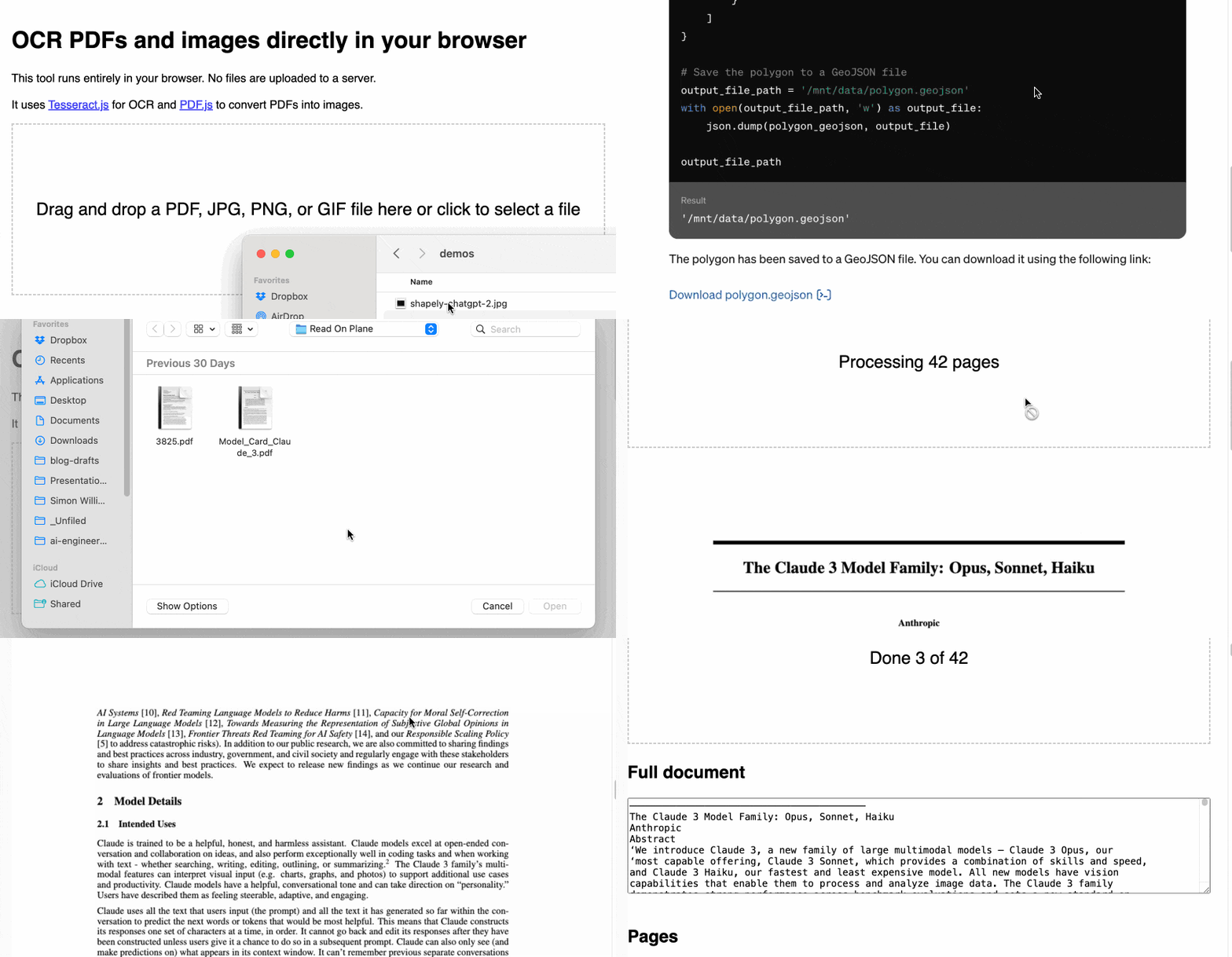
It’s not perfect: multi-column PDFs (thanks, academia) will be treated as a single column, illustrations or photos may result in garbled ASCII-art and there are plenty of other edge cases that will trip it up.
But... having Tesseract OCR available against PDFs in a web browser (including in Mobile Safari) is still a really useful thing.
How I built this
For more recent examples of projects I’ve built with the assistance of LLMs, see Building and testing C extensions for SQLite with ChatGPT Code Interpreter and Claude and ChatGPT for ad-hoc sidequests.
I built the first version of this tool in just a few minutes, using Claude 3 Opus.
I already had my own JavaScript code lying around for the two most important tasks: running Tesseract.js against an images and using PDF.js to turn a PDF into a series of images.
The OCR code came from the system I built and explained in How I make annotated presentations (built with the help of multiple ChatGPT sessions). The PDF to images code was from an unfinished experiment which I wrote with the aid of Claude 3 Opus a week ago.
I composed the following prompt for Claude 3, where I pasted in both of my code examples and then added some instructions about what I wanted it to build at the end:
This code shows how to open a PDF and turn it into an image per page:
<!DOCTYPE html>
<html>
<head>
  <title>PDF to Images</title>
  <script src="https://cdnjs.cloudflare.com/ajax/libs/pdf.js/2.9.359/pdf.min.js"></script>
  <style>
    .image-container img {
      margin-bottom: 10px;
    }
    .image-container p {
      margin: 0;
      font-size: 14px;
      color: #888;
    }
  </style>
</head>
<body>
  <input type="file" id="fileInput" accept=".pdf" />
  <div class="image-container"></div>

  <script>
  const desiredWidth = 800;
    const fileInput = document.getElementById('fileInput');
    const imageContainer = document.querySelector('.image-container');

    fileInput.addEventListener('change', handleFileUpload);

    pdfjsLib.GlobalWorkerOptions.workerSrc = 'https://cdnjs.cloudflare.com/ajax/libs/pdf.js/2.9.359/pdf.worker.min.js';

    async function handleFileUpload(event) {
      const file = event.target.files[0];
      const imageIterator = convertPDFToImages(file);

      for await (const { imageURL, size } of imageIterator) {
        const imgElement = document.createElement('img');
        imgElement.src = imageURL;
        imageContainer.appendChild(imgElement);

        const sizeElement = document.createElement('p');
        sizeElement.textContent = `Size: ${formatSize(size)}`;
        imageContainer.appendChild(sizeElement);
      }
    }

    async function* convertPDFToImages(file) {
      try {
        const pdf = await pdfjsLib.getDocument(URL.createObjectURL(file)).promise;
        const numPages = pdf.numPages;

        for (let i = 1; i <= numPages; i++) {
          const page = await pdf.getPage(i);
          const viewport = page.getViewport({ scale: 1 });
          const canvas = document.createElement('canvas');
          const context = canvas.getContext('2d');
          canvas.width = desiredWidth;
          canvas.height = (desiredWidth / viewport.width) * viewport.height;
          const renderContext = {
            canvasContext: context,
            viewport: page.getViewport({ scale: desiredWidth / viewport.width }),
          };
          await page.render(renderContext).promise;
          const imageURL = canvas.toDataURL('image/jpeg', 0.8);
          const size = calculateSize(imageURL);
          yield { imageURL, size };
        }
      } catch (error) {
        console.error('Error:', error);
      }
    }

    function calculateSize(imageURL) {
      const base64Length = imageURL.length - 'data:image/jpeg;base64,'.length;
      const sizeInBytes = Math.ceil(base64Length * 0.75);
      return sizeInBytes;
    }

    function formatSize(size) {
      const sizeInKB = (size / 1024).toFixed(2);
      return `${sizeInKB} KB`;
    }
  </script>
</body>
</html>
This code shows how to OCR an image:
async function ocrMissingAltText() {
    // Load Tesseract
    var s = document.createElement("script");
    s.src = "https://unpkg.com/tesseract.js@v2.1.0/dist/tesseract.min.js";
    document.head.appendChild(s);

    s.onload = async () => {
      const images = document.getElementsByTagName("img");
      const worker = Tesseract.createWorker();
      await worker.load();
      await worker.loadLanguage("eng");
      await worker.initialize("eng");
      ocrButton.innerText = "Running OCR...";

      // Iterate through all the images in the output div
      for (const img of images) {
        const altTextarea = img.parentNode.querySelector(".textarea-alt");
        // Check if the alt textarea is empty
        if (altTextarea.value === "") {
          const imageUrl = img.src;
          var {
            data: { text },
          } = await worker.recognize(imageUrl);
          altTextarea.value = text; // Set the OCR result to the alt textarea
          progressBar.value += 1;
        }
      }

      await worker.terminate();
      ocrButton.innerText = "OCR complete";
    };
  }
Use these examples to put together a single HTML page with embedded HTML and CSS and JavaScript that provides a big square which users can drag and drop a PDF file onto and when they do that the PDF has every page converted to a JPEG and shown below on the page, then OCR is run with tesseract and the results are shown in textarea blocks below each image.
I saved this prompt to a prompt.txt file and ran it using my llm-claude-3 plugin for LLM:
llm -m claude-3-opus < prompt.txtIt gave me a working initial version on the first attempt!
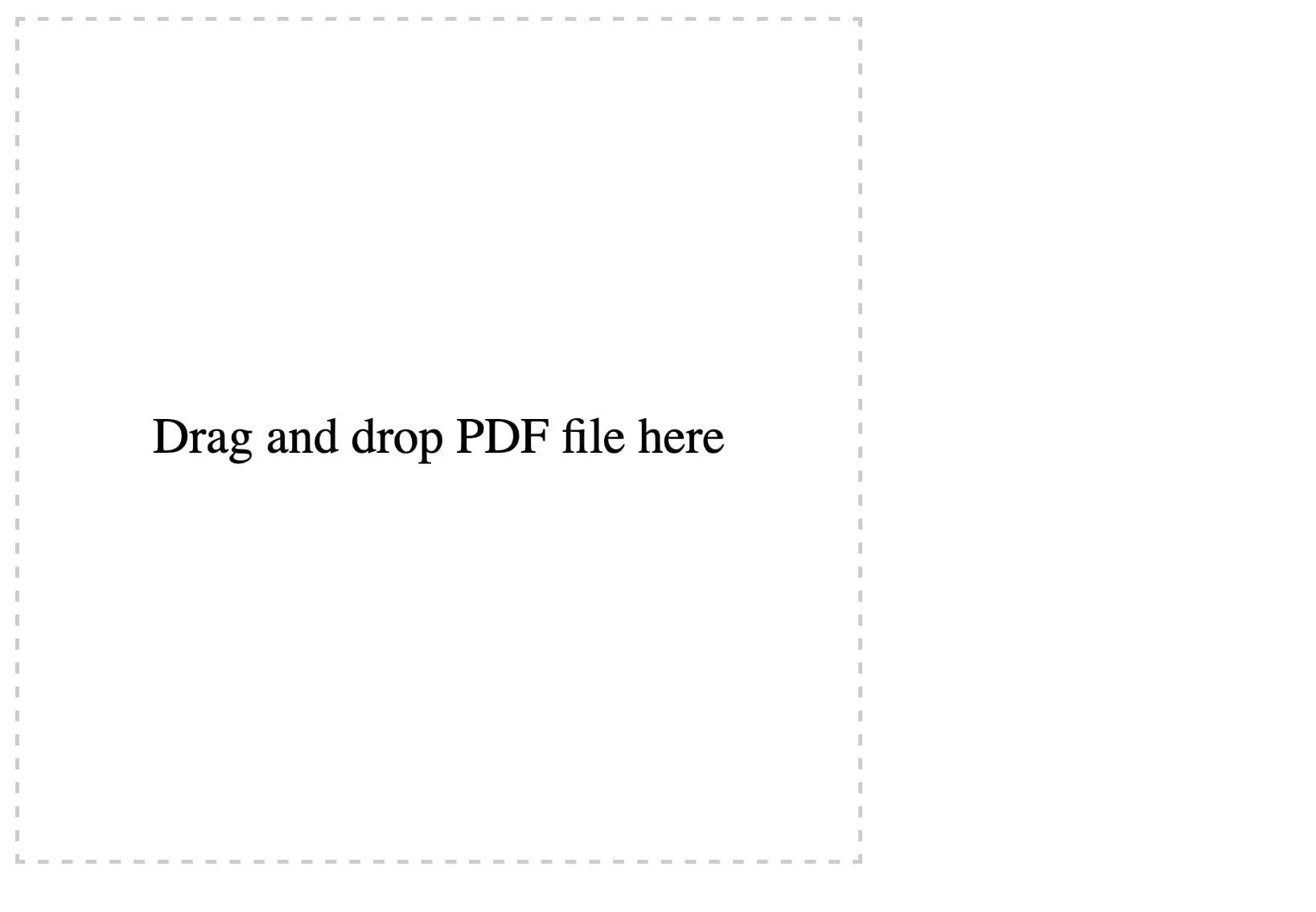
Here’s the full transcript, including my follow-up prompts and their responses. Iterating on software in this way is so much fun.
First follow-up:
Modify this to also have a file input that can be used—dropping a file onto the drop area fills that input
make the drop zone 100% wide but have a 2em padding on the body. it should be 10em high. it should turn pink when an image is dragged over it.
Each textarea should be 100% wide and 10em high
At the very bottom of the page add a h2 that says Full document—then a 30em high textarea with all of the page text in it separated by two newlines
Here’s the interactive result.
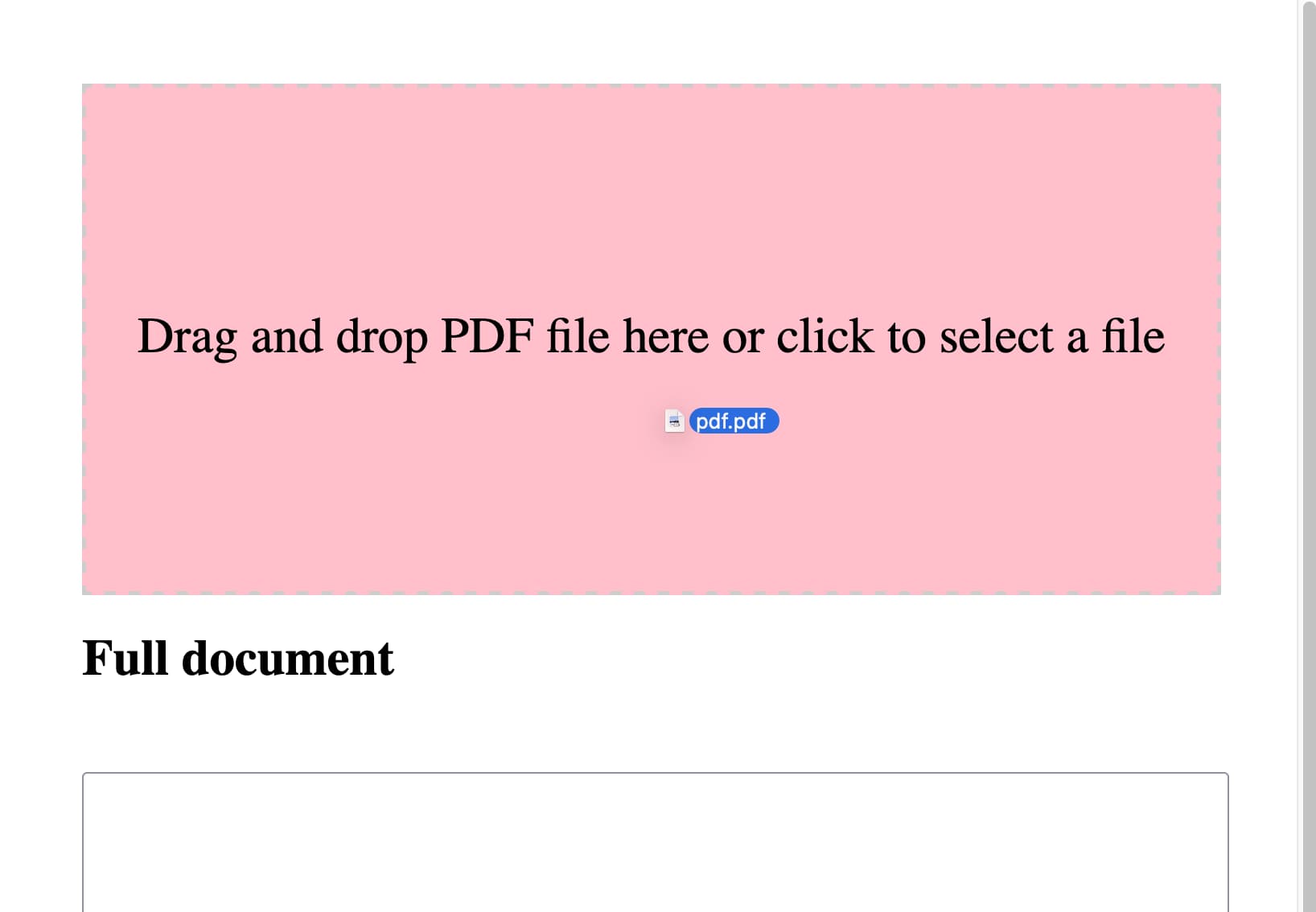
Rather delightfully it used the neater pattern where the file input itself is hidden but can be triggered by clicking on the large drop zone, and it updated the copy on the drop zone to reflect that—without me suggesting those requirements.
And then:
get rid of the code that shows image sizes. Set the placeholder on each textarea to be Processing... and clear that placeholder when the job is done.
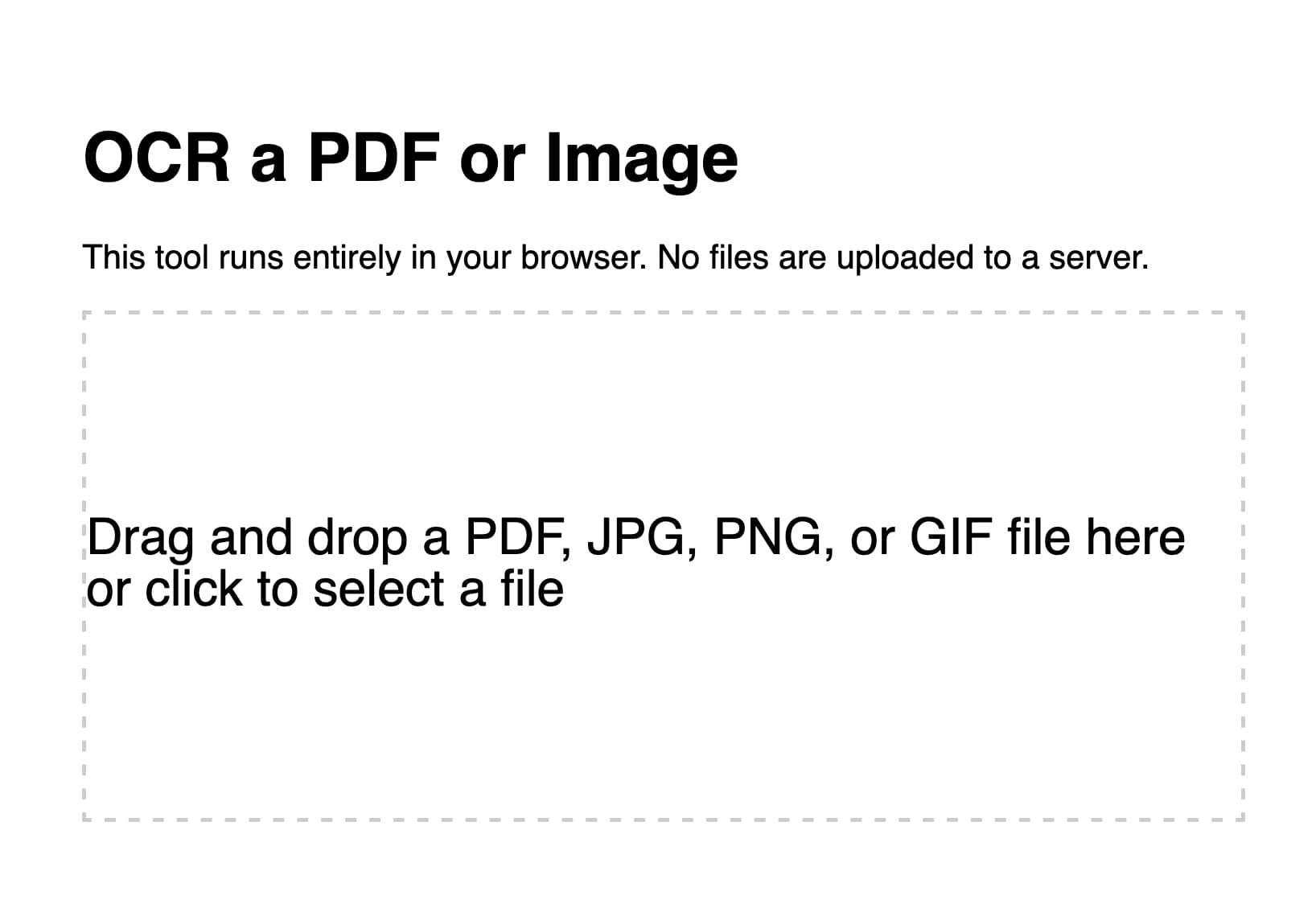
I realized it would be useful if it could handle non-PDF images as well. So I fired up ChatGPT (for no reason other than curiosity to see how well it did) and got GPT-4 to add that feature for me. I pasted in the code so far and added:
Modify this so jpg and png and gif images can be dropped or opened too—they skip the PDF step and get appended to the page and OCRd directly. Also move the full document heading and textarea above the page preview and hide it u til there is data to be shown in it
Then I spotted that the Tesseract worker was being created multiple times in a loop, which is inefficient—so I prompted:
Create the worker once and use it for all OCR tasks and terminate it at the end
I’d tweaked the HTML and CSS a little before feeding it to GPT-4, so now the site had a title and rendered in Helvetica.
Here’s the version GPT-4 produced for me.
Manual finishing touches
Fun though it was iterating on this project entirely through prompting, I decided it would be more productive to make the finishing touches myself. You can see those in the commit history. They’re not particularly interesting:
- I added Plausible analytics (which I like because they use no cookies).
- I added better progress indicators, including the text that shows how many pages of the PDF have been processed so far.
- I bumped up the width of the rendered PDF page images from 800 to 1000. This seemed to improve OCR quality—in particular, the Claude 3 model card PDF now has less OCR errors than it did before.
- I upgraded both Tesseract.js and PDF.js to the most recent versions. Unsurprisingly, Claude 3 Opus had used older versions of both libraries.
I’m really pleased with this project. I consider it finished—it does the job I designed it to do and I don’t see any need to keep on iterating on it. And because it’s all static JavaScript and WebAssembly I expect it to continue working effectively forever.
Update: OK, a few more features: I added language selection, paste support and some basic automated tests using Playwright Python.